
NOTE: I UPDATED ALL DOWNLOAD LINK
Hello again!
Remember i did a javascript version of the Tree Fractal(with the help of rosettacode)
So iv'e built another version in C#
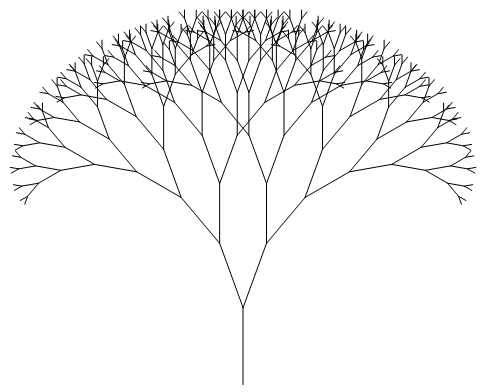
So here is the code:
using System;
using System.Collections.Generic;
using System.ComponentModel;
using System.Data;
using System.Drawing;
using System.Linq;
using System.Text;
using System.Windows.Forms;

namespace TreeFractal
{
    public partial class Form1 : Form
    {
        static public Pen p = new Pen(Color.Black, 1);
        static public Graphics g;
        static public double deg_2_rad = Math.PI / 180.0;
        static public float globalH;
        static public float globalW;
        static readonly object _locky = new object();

        public Form1()
        {
            InitializeComponent();
        }


        private void drawTree(float x1, float y1, double angle, int depth,  double angle1)
        {
            try
            {
                if (depth != 0)
                {

                    float x2 = (float)(x1 + (Math.Cos(angle * deg_2_rad) * depth * 10.0));
                    float y2 = (float)(y1 + (Math.Sin(angle * deg_2_rad) * depth * 10.0));
                    lock (_locky)
                    {
                        this.Update();
                        p.Color = Color.FromArgb((depth * 255) % 16 * 14, (depth * 255) % 16 * 14, (depth * 255) % 128 * 2);
                        g.DrawLine(p, x1, y1, x2, y2);
                    }

                    drawTree(x2, y2, angle - angle1, depth - 1, angle1);
                    drawTree(x2, y2, angle + angle1, depth - 1, angle1);

                }
            }
            catch (Exception ex)
            {
                MessageBox.Show(ex.ToString());
            }
        }

        private void TreeCanvasLimits(float x1,float y1, double angle,int depth,double angle1)
        {
             if (depth != 0){
              float x2 = (float)(x1 - (Math.Cos(angle * deg_2_rad) * depth * 10.0));
              float y2 = (float)(y1 - (Math.Sin(angle * deg_2_rad) * depth * 10.0));
              if (globalW > x2)
              {
                  globalW = x2;
              }
              if(globalH < y2)
              {
                  globalH = y2;
              }
              TreeCanvasLimits(x2, y2, angle - angle1, depth - 1,angle1);
              TreeCanvasLimits(x2, y2, angle + angle1, depth - 1,angle1);
             }
        }
        private void btnCreate_Click(object sender, EventArgs e)
        {
            g = this.CreateGraphics();

            try
            {
                //globalH = 0;
                //globalW = 0;
                //TreeCanvasLimits(0, 0, -90.0, int.Parse(txtDep.Text), double.Parse(txtAngle.Text));
                //this.Size = new Size((int)((globalW * (-2)) + 40), (int)((globalH + 60)));
                g.Clear(Color.White);
                drawTree((this.Width ) / 2, (this.Height - 150), -90.0, int.Parse(txtDep.Text), double.Parse(txtAngle.Text));
            }
            catch(Exception exx)
            {
                MessageBox.Show(exx.ToString());
            }
        }

        private void btnLoop_Click(object sender, EventArgs e)
        {
            try
            {
                g = this.CreateGraphics();
                g.Clear(Color.White);
                for (int i = 0; i < 361; i++)
                {
                    //g.Clear(Color.White);
                    //p.Color = Color.FromArgb((int)(i/4),(int)(i/3), (int)(i/2));
                    //MessageBox.Show("before " + i.ToString());
                    this.SuspendLayout();
                    drawTree((this.Width) / 2, (this.Height - 150), -90.0, 10, (double)i);
                    //System.Threading.Thread.Sleep(100);
                    this.ResumeLayout();
                    Application.DoEvents();
                    //MessageBox.Show("after " + i.ToString());
                    this.Update();
                }
                MessageBox.Show("Done");
            }
            catch (Exception ex)
            {
                MessageBox.Show(ex.ToString());
            }
        }

        protected override void WndProc(ref Message m)
        {
            base.WndProc(ref m);
            this.Update();
        }
    }
}
and here is a download link
Download The Project (rar file)
Download The Project (rar file)
